cannabis-label-maryland (v1)
The JobSchema for Maryland personalized patient labels — the sticker a dispensary attaches to each medical-cannabis product dispensed to a qualifying patient. One job represents one dispensing transaction; the printer emits one label per unit of each line item (see Multiple line items).
This schema and its template implement the personalized-label requirements of COMAR Title 14, Subtitle 17, Chapter 18 (Maryland Cannabis Administration packaging & labeling), principally 14.17.18.04E. It is intended for a label-capable printer loaded with die-cut adhesive label stock, not a receipt printer.
The citations below describe how the schema and default template are designed to satisfy Maryland regulation. They are provided for context and are not legal advice — the dispensary remains responsible for compliance, including confirming that the data it sends is accurate and complete.
Metadata
| Field | Value |
|---|---|
name | cannabis-label-maryland-v1 |
vertical | cannabis |
version | 1 |
source | apiV20 |
What this prints
Each job is a single dispensing transaction. Every printed label is self-contained: it repeats the shared transaction data (patient, certifying provider, dispensary, date) and carries the details of exactly one product, followed by the fixed transfer-illegality warning.
The label is designed as a compact, text-only sticker (no logos or imagery) so it fits the blank space the processor reserves on the product package and does not cover the package's own required labeling. Maryland prohibits cartoons or imagery attractive to minors on cannabis labeling (14.17.18.01B(1), 14.17.18.02).
Multiple line items
This is the core of how a cannabis label job differs from a restaurant ticket: it does not print one combined ticket — it prints one label per product package.
- Each entry in
line_items[]is one product. - An entry's
quantityis the number of units of that product, and one label prints per unit.quantity: 2produces two identical labels for that product. - The total number of labels printed is the sum of
quantityacross all line items. - Labels print in
line_itemsorder; within a line item, its N identical labels print consecutively. - The shared transaction block (patient, provider, dispensary, date) is identical on every label; only the product block (elements 5–9) changes between products.
Why one label per unit
Maryland requires a personalized label on each product package. Every dispensed package "shall include a personalized label" (14.17.18.04E), and the processor maintains blank space on each package for the dispensary to attach it (14.17.18.04B(1)). A single combined label covering several products is not compliant — hence one label per unit, per product.
Example
A job with two line items:
| Line item | product_name | quantity | Labels printed |
|---|---|---|---|
| 1 | Blue Dream Flower 3.5g | 1 | 1 |
| 2 | Restful Night Tincture 30ml | 2 | 2 |
| Total | 3 |
Three labels come off the printer: one Blue Dream label, then two identical Restful Night labels. All three carry the same patient / provider / dispensary / date block. This is the example payload below.
Required content — the nine elements
Every label carries the nine elements required by COMAR 14.17.18.04E. Elements 1–4 come from the shared transaction data; elements 5–9 come from the individual line item.
| # | Element | Field | Notes |
|---|---|---|---|
| 1 | Patient name | patient.name | |
| 2 | Certifying provider name | certifying_provider.name | |
| 3 | Dispensing licensee | dispensary.name | |
| 4 | Date dispensed | dispensed_date | Printed as MM/DD/YYYY |
| 5 | Product name | line_items[].product_name | |
| 6 | Cannabinoid & terpene strengths | line_items[].compounds[] | One entry per compound, printed {name}: {amount}{unit} |
| 7 | Quantity dispensed | line_items[].quantity_dispensed | {amount} {unit} |
| 8 | Directions for use | line_items[].directions_for_use | Required; the row prints on every label — see below |
| 9 | Storage / handling instructions | line_items[].storage_instructions |
Directions for use are required
directions_for_use is required on every line item and prints on every label. Omitting it is rejected — the job creation fails with a 400 and nothing prints.
When a product genuinely has no directions, send the literal string "None". It prints verbatim, as an affirmative declaration on the label. That distinction matters: "None" states that the product has no directions, whereas an absent field is a data gap, and a personalized label missing element 8 is not compliant with COMAR 14.17.18.04E(8).
Required warning text
Every label carries this fixed warning, supplied by the template — you do not send it in orderData:
WARNING: It is illegal for any person other than the qualifying patient named on this label to possess or consume the contents of this package. It is illegal to transfer this package or its contents to any person other than a transfer by a caregiver to the qualifying patient.
Maryland requires a clear warning that it is illegal for anyone other than the qualifying patient to possess or consume the contents, and illegal to transfer the package except by a caregiver to the patient (14.17.18.04B(2)). The rules expressly allow this warning to be applied via a point-of-sale sticker such as the personalized label (14.17.18.04D) — which is exactly what this label is.
Formatting the data you send
The template prints the data you send largely verbatim, with a few regulation-driven rules you should be aware of when populating orderData:
- Prohibited wording in
product_name. The product name is printed verbatim and the label adds no wording of its own, so the name you send must not contain wording prohibited by COMAR 14.17.18.07 — among others the words "candy" or "candies", depictions or names of food, baked goods, cereal or beverages, cartoon or celebrity references, health-benefit claims, and misleading statements. Enforcement is the licensee's duty — the name is not screened for you. directions_for_useis required. Send"None"when the product has no directions; see Directions for use are required.- Leading zero on sub-1% concentrations. A compound
amountbelow 1 with unit%prints with a leading zero —0.2%, never.2%— as required by 14.17.18.04E(6)(b). Send the numeric value (0.2); the leading zero is handled for you. - Units appropriate to the dosage form. Compound strengths (element 6) and quantity dispensed (element 7) use units appropriate to the product's dosage form (14.17.18.04E(6)(a), (7)). The unit you send is printed as given — send the correct unit for the form (e.g.
%for flower,mg/mlfor a tincture). - Minimum text size. All label text renders at or above the 6-point / ¹⁄₁₂-inch minimum (14.17.18.03B(2)). Required content is never shrunk below that floor or truncated — long text wraps instead. The label is a fixed-size sticker, so wrapped text has to fit it; the field length limits are how you stay inside.
- English. Template captions and the warning are in English (14.17.18.03B(3)). Product data you send is printed as supplied.
What this label does not include
Some items required by Maryland's packaging rules are not on this label because they already appear on the processor's product package. Do not send them — the label deliberately omits them to reserve space for the nine required elements:
- The universal THC symbol (required on the package under 14.17.18.03F, not on the personalized label).
- The package's standing warnings, poison-control number, net weight, lot number, licensee/manufacturer info, and ingredient list (14.17.18.03).
- Ingredients and major allergens, which Maryland places on the processor's package label (14.17.18.03D). Their absence here is deliberate: Florida places FALCPA allergen identification on the dispensing label instead, so cannabis-label-florida (v1) carries an ingredient list and this schema does not. Both are correct for their state — do not send a Florida-shaped payload here.
Shape
orderData: object
├── id: string                                   # required — dispensing-transaction identifier (minLength 1, maxLength 64)
├── dispensed_date: string (date)                # required — ISO 8601 date, e.g. "2026-07-03"
├── dispensary: {                                # required
│     name,                                       #   required — maxLength 34
│     license_number?,                            #   maxLength 32
│     phone?,                                     #   maxLength 20
│     website?                                    #   maxLength 64
│   }
├── patient: {                                   # required
│     name,                                       #   required — maxLength 40
│     patient_id?                                 #   optional (not a printed element) — maxLength 32
│   }
├── certifying_provider: { name }                # required — name maxLength 38
└── line_items: [LabelItem, ...]                 # required — minItems 1
LabelItem
{
  quantity: integer (≥ 1),          # required — one label prints per unit
  product_name: string,             # required — maxLength 60
  compounds: [                      # required — minItems 1, maxItems 6
    {
      name: string,                 #   required — e.g. "THC", "CBD", "CBN", "Myrcene" — maxLength 12
      amount: number (≥ 0),         #   required
      unit: "%" | "mg" | "mg/g"     #   required
          | "mg/ml" | "mg per serving"
    },
    ...
  ],
  quantity_dispensed: {             # required
    amount: number (> 0),           #   required
    unit: string                    #   required — e.g. "g", "ml", "capsules", "units" — maxLength 12
  },
  directions_for_use: string,       # required (minLength 1) — send "None" if there are none — maxLength 180
  storage_instructions: string      # required — maxLength 200
}
orderData is validated strictly — unknown/extra properties are rejected.
Required fields
| Scope | Required fields |
|---|---|
orderData (root) | id, dispensed_date, dispensary, patient, certifying_provider, line_items |
each line_items[] entry | quantity, product_name, compounds, quantity_dispensed, directions_for_use, storage_instructions |
each compounds[] entry | name, amount, unit |
quantity_dispensed | amount, unit |
dispensed_date must be an ISO 8601 date (YYYY-MM-DD).
webhook_url and webhook_method are also required on every job creation, but live at the root of the POST body (alongside printerId), not inside orderData. See the Create job page.
The callback sent to webhook_url carries only a state update — the Job id, the state change, your externalId, and timestamps. No orderData is transmitted to your webhook URL, so the patient and caregiver blocks and patient_id you supply here are never sent to that endpoint. Retrieve them, if you need them, with an authenticated request to GET /v20/jobs/{jobId}.
Field length limits
Every field below is capped. A payload that exceeds a cap is rejected when the job is created — the request fails with a 400 and nothing prints. The caps are set so that a label built from a payload respecting all of them fits the stock.
| Payload path | Limit |
|---|---|
id | 64 characters |
patient.name | 40 characters |
patient.patient_id | 32 characters |
certifying_provider.name | 38 characters |
dispensary.name | 34 characters |
dispensary.license_number | 32 characters |
dispensary.phone | 20 characters |
dispensary.website | 64 characters |
line_items[].product_name | 60 characters |
line_items[].directions_for_use | 180 characters |
line_items[].storage_instructions | 200 characters |
line_items[].quantity_dispensed.unit | 12 characters |
line_items[].compounds | at most 6 entries |
line_items[].compounds[].name | 12 characters |
line_items[].compounds is a limit on the number of compounds on a line item, not on the length of anything. Each entry's name is capped separately.
id and patient.patient_id are not printed on the label. Their caps keep the payload well-formed; they have nothing to do with what fits.
When content does not fit
A job that respects every cap above does not hit this. It is what happens when a label still does not fit its stock.
The job fails and no label prints. The Job moves to the error state and your endpoint receives a job.error callback, which is terminal. Nothing is truncated, and no partial label comes out of the printer.
Earlier this behaved differently: an over-long label printed past its own edge onto the next label, quietly ruining two labels instead of one. Failing the job outright is the deliberate replacement — a job you can see fail is better than two stickers a patient should not receive.
See Webhooks for job.error and the other terminal callbacks, and GET /v20/jobs/{jobId} for the state field.
Printed output
The default template produces a square label on 3″ × 3″ (76.2 × 76.2 mm) die-cut stock. The preview below is one label — the Blue Dream line item from the example. The same job also prints two identical Restful Night labels (quantity: 2), for three labels total.
Content shorter than the label leaves the rest of the stock blank, as here. Content that does not fit fails the job — see When content does not fit.
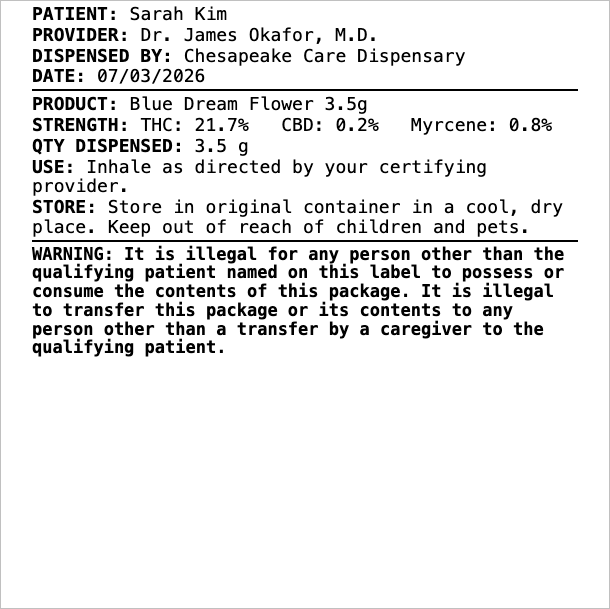
The thin outline marks the edge of the label stock. It is not printed.
Example
Two line items — quantities 1 and 2 — producing three labels:
{
  "id": "MD-DISP-44120",
  "dispensed_date": "2026-07-03",
  "dispensary": {
    "name": "Chesapeake Care Dispensary",
    "license_number": "D-18-00077",
    "phone": "410-555-0133"
  },
  "patient": {
    "name": "Sarah Kim",
    "patient_id": "MCA-P-556677"
  },
  "certifying_provider": {
    "name": "Dr. James Okafor, M.D."
  },
  "line_items": [
    {
      "quantity": 1,
      "product_name": "Blue Dream Flower 3.5g",
      "compounds": [
        { "name": "THC", "amount": 21.7, "unit": "%" },
        { "name": "CBD", "amount": 0.2, "unit": "%" },
        { "name": "Myrcene", "amount": 0.8, "unit": "%" }
      ],
      "quantity_dispensed": { "amount": 3.5, "unit": "g" },
      "directions_for_use": "Inhale as directed by your certifying provider.",
      "storage_instructions": "Store in original container in a cool, dry place. Keep out of reach of children and pets."
    },
    {
      "quantity": 2,
      "product_name": "Restful Night Tincture 30ml",
      "compounds": [
        { "name": "THC", "amount": 10, "unit": "mg/ml" },
        { "name": "CBN", "amount": 5, "unit": "mg/ml" }
      ],
      "quantity_dispensed": { "amount": 30, "unit": "ml" },
      "directions_for_use": "None",
      "storage_instructions": "Refrigerate after opening. Keep out of reach of children and pets."
    }
  ]
}
This orderData is the body of a POST /v20/jobs request (alongside printerId, webhook_url, and webhook_method). See Create job.